
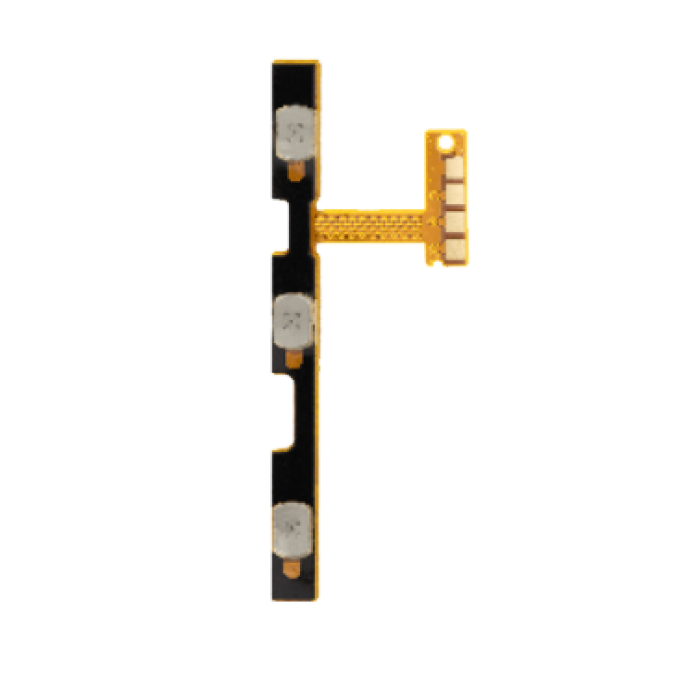
Power And Volume Flex Cable Compatible For Samsung Galaxy A03 (A035U / 2021)
$1.19
Product Details
-
Compatible Models:
- Samsung Galaxy A02S (A025U / 2020)
- Samsung Galaxy A03 (A035U / 2021)
-
Function:
- The Power and Volume Flex Cable is responsible for the physical buttons that control the power, volume, and potentially the vibration motor and fingerprint sensor (depending on the model).
- This part ensures that pressing the power and volume buttons is properly registered by the device’s internal circuitry.
-
Aftermarket Part:
- The replacement is typically an aftermarket part, which is designed to be a cost-effective alternative to the original. It is made to the same standards to ensure compatibility and performance.
- Non-Responsive Power Button: The power button may not respond when pressed, preventing the device from turning on or off.
- Non-Responsive Volume Buttons: The volume buttons might not change the volume, or they might get stuck or feel unresponsive.
- Unintentional Button Presses: Sometimes, damaged flex cables can cause the buttons to press unintentionally or cause the device to turn on or off without user input.
- No Vibration: If the vibration motor is integrated into the flex cable, failure of the cable can cause the vibration motor to stop working.
- Issues with the Fingerprint Sensor: In some models, the flex cable may also be connected to the fingerprint sensor, so any issues with this component could impact fingerprint scanning.
-
Tools Needed:
- Plastic Pry Tools: For opening the phone without damaging the screen or internal components.
- Small Screwdrivers: For removing screws that secure internal components.
- Suction Cup: To carefully lift the screen or back cover.
- Tweezers: To handle small components and connectors carefully.
- Adhesive: To secure the flex cable if required.
-
No Soldering: The Power and Volume Flex Cable typically connects using ribbon cables or connectors, meaning no soldering is needed during installation.
-
Alignment: Proper alignment of the flex cable is crucial, as improper connection may cause the buttons to be non-functional or interfere with other components.
- Power Off the Device: Ensure the device is powered off before starting any repair.
- Remove the Back Cover or Screen: Use a plastic pry tool or suction cup to remove the cover or screen of the device. Depending on the model, this step might require heat to loosen any adhesive.
- Disconnect the Battery: For safety, always disconnect the battery before performing any repairs.
- Remove the Old Flex Cable: Carefully detach the old power and volume flex cable by removing screws and disconnecting the connectors that hold it in place.
- Install the New Flex Cable: Place the new flex cable in its correct position, making sure the connectors are properly aligned. Ensure that all buttons and components are securely in place.
- Reassemble the Device: After installing the new flex cable, reconnect the battery and reassemble the device.
- Test the Device: Power on the phone and test the power button and volume buttons to ensure they are functioning properly. Also, test the vibration motor if applicable.
- Power Button Test: Ensure the device turns on and off with the power button, and it responds to press actions.
- Volume Button Test: Check if the volume buttons increase and decrease the sound level.
- Vibration Test: If the vibration motor is part of the flex cable, test it by setting the phone to vibrate mode and checking for vibration.
- Other Button Functions: If your model includes a fingerprint sensor or additional features connected to the flex cable, make sure to test these functions after installation.
The Power and Volume Flex Cable compatible for the Samsung Galaxy A02S (A025U / 2020) and A03 (A035U / 2021) is a replacement part that controls the power button, volume buttons, and may also include the vibration motor and other related components. If you're experiencing issues with the power or volume buttons, or if they are physically damaged, this flex cable replacement will restore full functionality.
Key Features:
Symptoms of a Faulty Power and Volume Flex Cable:
Installation Considerations:
Installation Process:
Testing:
Professional Help:
If you're not comfortable performing the repair yourself or lack the necessary tools, it’s best to seek help from a professional technician. A technician can complete the replacement quickly and ensure proper installation without causing damage to other components.
Summary:
The Power and Volume Flex Cable for the Samsung Galaxy A02S (A025U / 2020) and A03 (A035U / 2021) is an essential replacement part for resolving issues with power, volume buttons, and potentially the vibration motor and fingerprint sensor. The installation is straightforward and typically doesn’t require soldering, though professional assistance is recommended if you're unsure of the process or lack the tools. Replacing the flex cable will restore full functionality to your device's buttons and associated components.